Subjects, lessons, and your weekly rhythm
The plan lives in three places. Settings holds your subjects, their weekly rhythm, your breaks, and hours if you keep them. Curriculum holds each subject’s lessons, and you can add or change a subject there too. The planner shows the week they make. All of it is optional, all of it is editable, and none of it is ever compared against what actually happened. Set up as much or as little as you find useful.
Subjects
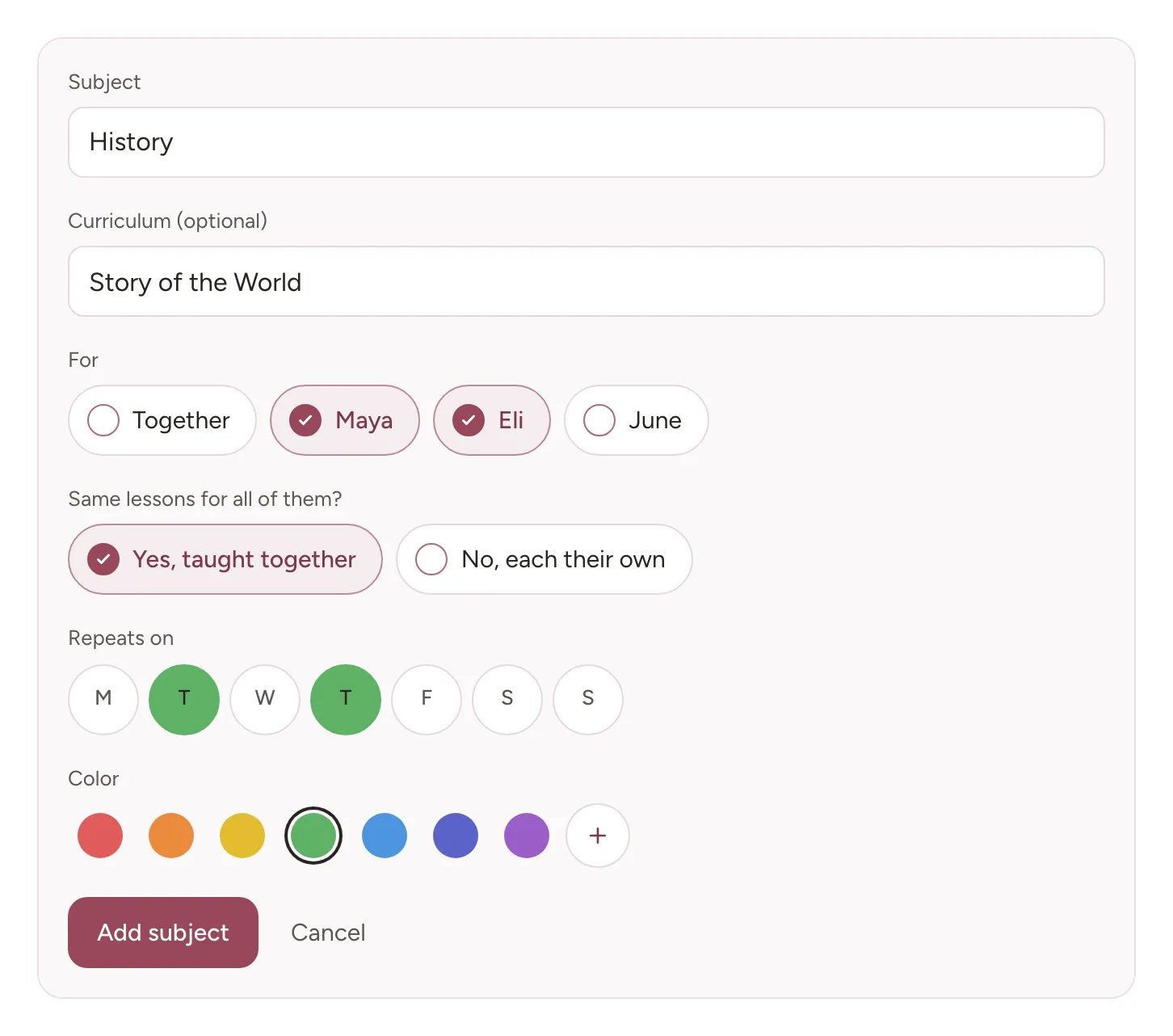
Subjects belong to a school year. Add one in Settings, under Subjects, or with Add subject on Curriculum. A subject added in one place shows everywhere else too. Between them, the two forms ask for:
A name. Whatever you call it at home. Biology, Reading, Nature Study, Piano. There is no approved list.
Curriculum, optional. The program or books you use, if any. Worth filling in if you might ever need to say what you taught from, because it appears on records later and is tedious to reconstruct.
Who it is for. Under For, choose Together for every child, or the children it is for by name. In Settings, when more than one child is chosen, the form asks “Same lessons for all of them?” Choose Yes, taught together, and they share one lesson list and one block on the planner and on Home, and one tap ticks it for all of them. Choose No, each their own, and every child gets a list and blocks of their own. On Curriculum, a subject for several children is taught together, and the form says so under For.
Repeats on. The weekdays it usually happens. Settings asks for them with the subject. For a subject added on Curriculum, set them in its weekly rhythm, below. Leave them empty for a subject you place by hand, such as an occasional co-op.
A color. How its blocks look on the planner and on Home. Choose one from the row, or the plus for more colors.
A usual length. About how long it takes on a normal day. It matters only if you keep hours, which you turn on or off in Settings, under Hours: then a tick counts this much. A new length applies from today on, and days already lived keep theirs. If one day runs longer or shorter, change that day on its block in the planner, on a laptop.
Changing one later. On Curriculum, open the subject and choose Edit subject, the pencil beside its name. There you can change its name, its curriculum, its usual length, and its color, for example when you switch to a new program partway through the year. Settings, under Subjects, has the same pencil on each subject’s row. Who a subject is for is set when you add it.
Breaks and days off
Breaks mark the days you are not schooling: a vacation, a holiday week, a few days at home. Add one in Settings, under School year, with Add a break. On a laptop you can also take one from the planner: open a day’s details from its heading, pick the last day under A break, then Take the break. The planner shows a break’s weeks muted and named, and its week numbers count school weeks only.
A day inside a break is not counted as a school day. A tick, a photo, or a grade on a break day is still kept, but the day counts only if you count it yourself: on Records, pick the day and choose Count this day, which works inside a break too. The same goes for a break you add over days you already ticked: those days stop counting.
For a single day, the same day details offer Not that day, for a sick day or a day off. It takes the day’s blocks off, and their lessons wait for their next turn. Only something planned for that day alone, with no lessons, such as a field trip, stays on its date. Move this day takes every block on it to a day you pick instead. Under Who, choose only the children it is about. Shared classes move only with everyone. Either way, a block already ticked stays where it is.
Weekly rhythm
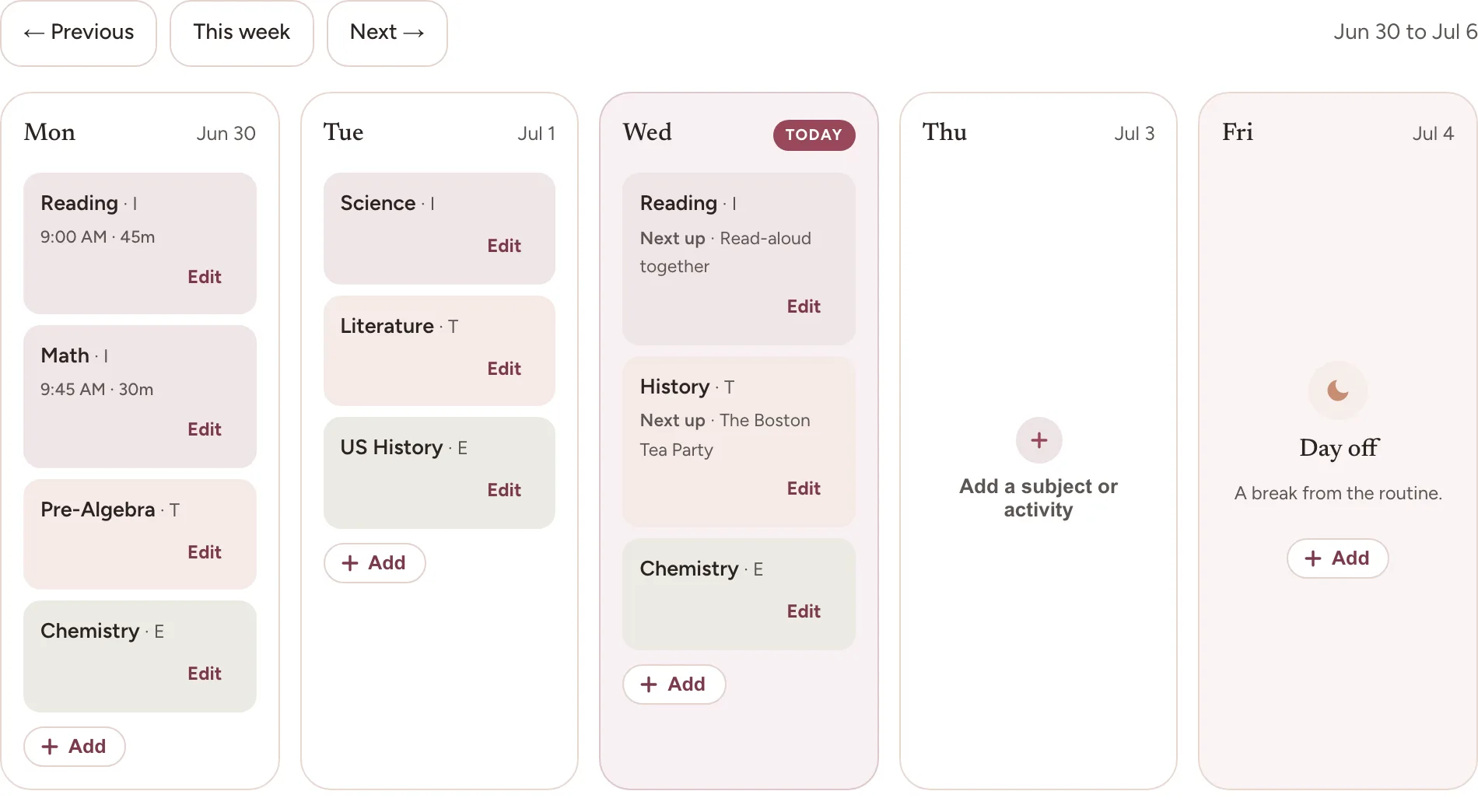
Your rhythm is the ordinary shape of a week: which subjects usually happen on which days. The planner fills each week from it, so you are reading a familiar week rather than an empty grid.
To change it, open a subject’s Weekly rhythm. In Settings, under Weekly rhythm, tap the subject’s row. On Curriculum, open the subject and tap the line under its name that shows its days, or Planned day by day. In the planner’s Plan mode on a laptop, use the pencil beside Repeats on in the subject’s card.
Weekly rhythm asks first when the change should start: Today, Next week, a later week, or any date you choose. A date inside a break starts on the school day after it. Then choose the days under Repeats on. If your days run on a clock, which you turn on under Options in the planner, a row called Usually lets each day run In turn, after whatever comes before it, or At a time you choose. A change set to start later is listed under the days, where you can take it back, and each change shows a note with Undo. Days already lived keep their rhythm and their times.
To change one day without touching the rhythm, use the planner. On a laptop, switch to Plan and drag a subject or a lesson by its handle onto a day, or tap Plan a day and then Place here. On a phone, tap Add to this day on the day’s card. Either way it is just that day, and the weekly rhythm stays as it was. If that day is today or later and falls on a weekday the subject does not repeat on, the note that follows offers Every Thursday, named for its weekday, to have the subject repeat on that weekday from then on.
Why a planned block is never marked missed
A planned block you never ticked is shown plainly, in its full color. It is not red, it is not labeled overdue, and it is not subtracted from anything. Nothing in the app sets what you planned against what you ticked to produce a shortfall. When the last school day has blocks with no tick, Home and the planner ask whether they happened. Say they did and they are recorded for that day, let them go and nothing on the record changes, or leave the question for later.
This is a deliberate design decision rather than a feature we have not built. A planner that quietly scores you against your own optimism in August is a planner you stop opening in November, and the record it was keeping stops too.
Lesson outlines
If you keep an outline for a subject, it is a list you write on Curriculum and tick off as you go. Each block on the planner and on Home shows its subject’s next lesson, and a tick records that lesson and brings up the one after it. The app never works out whether you are behind.
Show ahead, on a subject’s card in the planner’s Plan mode on a laptop, lets the outline flow along the coming days, so you can see roughly where each lesson will fall. A subject turns it on by itself the first time it gets lessons, and you can turn it off again there; adding more lessons later leaves it as you set it. The lessons stay undated, and a line gives a rough date for the last lesson at this rhythm. It is a forecast, not a deadline. With Show ahead off, only the next lesson shows, on the next day the subject repeats.
To put a particular lesson on a particular day, open the block on a laptop and choose it under Lesson for this day. You can choose more than one, and each becomes a block of its own, planned back to back. A lesson planned for a day that passes without a tick stays on that day and shows as Next up too, rather than becoming something you missed.
You do not have to type an outline. On Curriculum, the scan icon at the end of a subject’s add-lessons box reads a book’s contents page: take a photo of it, choose photos (one at a time in the phone apps), or choose a PDF, and Bowerstead lists the lessons it found, already ticked, for you to check. Tests and reviews come unticked, and you can rename any lesson or add the units instead before you choose Add. Each lesson keeps its unit and page in its details, and Undo takes them all back. The page goes to an AI service to be read, with the names of the subject and its curriculum, and we keep no copy. That service deletes it within thirty days, unless its safety checks flag the request as misuse, which it may keep for up to two years. So take the photo of the contents page alone. The first time you scan on a device, the scanner says what it sends and asks first: nothing goes until you choose Scan a page.
Frequently asked questions
What happens if we do not follow the weekly rhythm? Nothing at all. A planned block you never ticked is shown plainly, never as missed or overdue, and nothing sets what you planned against what you did to produce a shortfall.
Do I have to add breaks? No. A break tells Bowerstead which days are not school days, so a day inside one is not counted, even if you ticked or saved something on it. If you did school that day after all, count it by hand on Records with Count this day.
Can I add a subject in the middle of the year? Yes. Subjects belong to a school year rather than to a start date, so one added in February works exactly like one added in August. It shows on the planner on its days from today.
Where to go next
Capturing work is the other half of this: the plan is what you meant to do, and a tick or a capture is what happened.