School days and attendance
School days count themselves. Tick a lesson for a child, or save a photo or a grade for them, and that day is on their record. You will only need the calendar on Records for a day you did school without ticking or saving anything.
Finding it
Open Records. In the phone app, it is under More. Records is one page for each child: choose the child in the middle of the bar at the top, or on a phone, in the tabs under the title. School days, at the top of the page, is the count for the school year so far, with this week’s days under it. The Days card below shows a calendar of this month and the one before, or this month alone on a phone, and its arrows step back through the year a month at a time. To look at another school year, open Options at the top right and choose it under School year.
Reading the calendar
From your ticks. A filled day. Something was saved for this child that day: a tick, or a photo or grade on its own. Pick the day to see the subjects ticked and, if you keep hours, how long the day ran, with Open in the planner beside it. Records never takes a tick away. A filled day comes off when what filled it is taken back, such as a tick undone in the planner or a photo deleted in Moments.
Added by you. A lightly shaded day with a small dot, one you counted by hand. Worth being able to tell apart, because one carries what you saved and the other is your word for it.
Today. The ringed day. Days after today are paler and cannot be picked yet, and neither can days outside the school year.
A day inside a break is not counted, even if you ticked or saved something on it. Pick one and it says so, with the break’s name, such as Thanksgiving, a break. Not counted. If you did school that day after all, count it by hand as below. That works inside a break too.
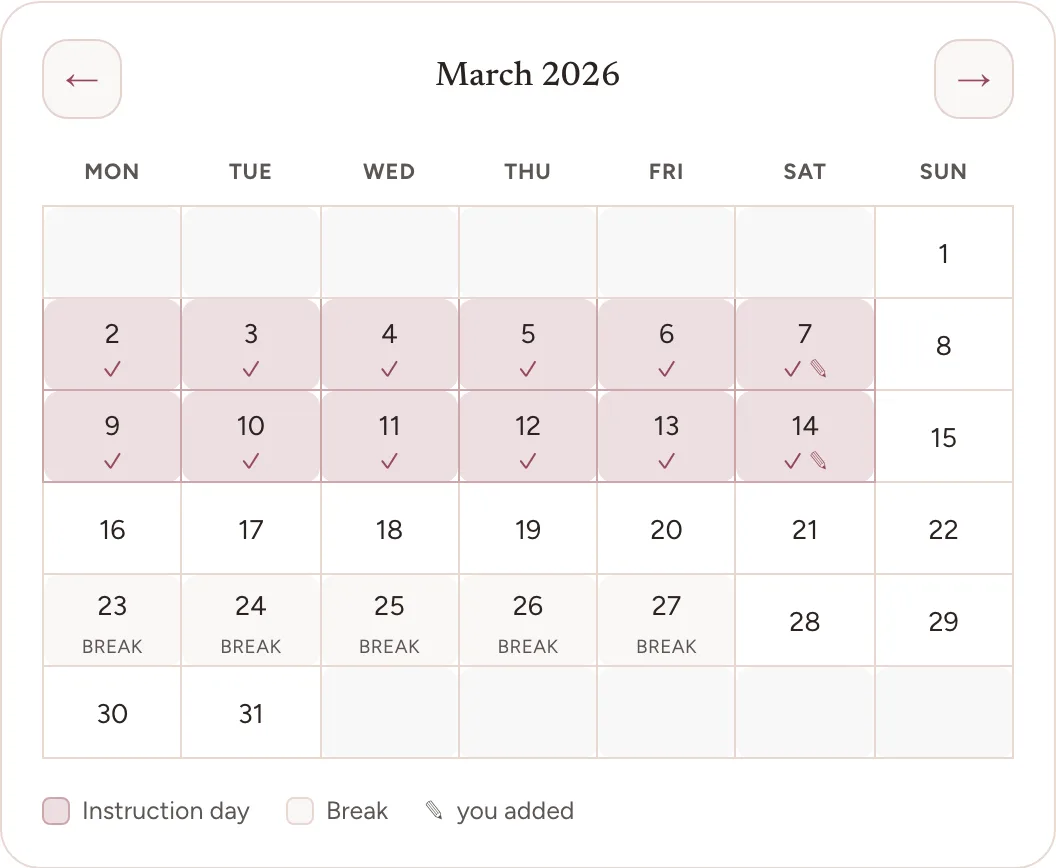
Counting a day by hand
Pick the day on the calendar. If it was not counted, the line under the calendar says so, with Count this day beside it. Choose Count this day and the day counts at once, for the child whose record you are on. It then shows as Added by you, and its line offers three more things.
Also count it for. This names your other children who do not have that day yet. One tap counts it for them too, which suits a field trip you all went on.
How long. If you keep hours, set the day’s length in half-hour steps with the minus and plus buttons, up to ten hours. It is optional and never filled in for you, so a day counted with no length adds no hours.
Take it off. This removes a day you counted by mistake. Only the days you added have it.
A day counted by hand belongs to no subject, so the Subjects card lists these days in a row of their own at the end, Days you added, with how many there are.
This exists for the honest gaps: the field trip you never wrote up, the weeks of the year before you started using Bowerstead, the day school clearly happened and nothing got ticked. Where you can, tick the day’s lessons in the planner instead, because a tick says what was done and a day counted by hand carries only the date.
The count is per child
Each child has their own count, because each child’s year is their own. A lesson they do together, ticked once, counts for each of them. A day where one child did school and another was ill is a school day for one of them.
What the count means
It is a count of days you recorded, and nothing more. There is no target unless you set one, no percentage, and nothing changes color as the year goes on. It grows as you go, and quiet weeks simply add fewer days than busy ones.
A goal is yours to set or leave blank, in Settings under School year, as your Instruction-day goal. With one set, Records shows On track beside School days while your count keeps pace with it across the year’s dates. When it does not, Records shows the count and nothing else: never how many are left, and never your count set against the goal.
We do not tell you how many days your state expects. Requirements change, they vary widely, and a number we showed you and failed to keep current would be worse than no number at all. Check yours with your own state, and use this count as your record of what you did.
Frequently asked questions
Do I need to mark attendance every day? No. Ticking a lesson, or saving a photo or a grade for a child, counts that day on their record by itself. You only need Records for a day that genuinely happened and has nothing ticked or saved.
Does a day inside a break still count? No, not on its own. A tick, a photo, or a grade saved on a break day is kept, but the day is not counted. If you did school that day after all, pick it on Records and choose Count this day, which works inside a break too.
Can I remove a day I added by mistake? Yes. Pick the day on Records and choose Take it off. Only the days you added have it, so correcting one does not disturb a day counted from what you saved. That day comes off when what filled it is taken back, such as a tick undone in the planner or a photo deleted in Moments.
Where to go next
Exporting records covers turning this into something you can hand over.