What Bowerstead does
Bowerstead keeps the record of your homeschool year as it happens, so that the day someone asks what you taught, the answer is already written. It is a filing cabinet and a calendar, not a curriculum.
The four things it holds
A plan. Your subjects, the lessons you list for each on Curriculum if you like, a weekly rhythm, and breaks. The planner shows it by the day, the week, or the month. The plan is a backbone, not a schedule you can fall behind on: a block you did not get to is never marked late or missed.
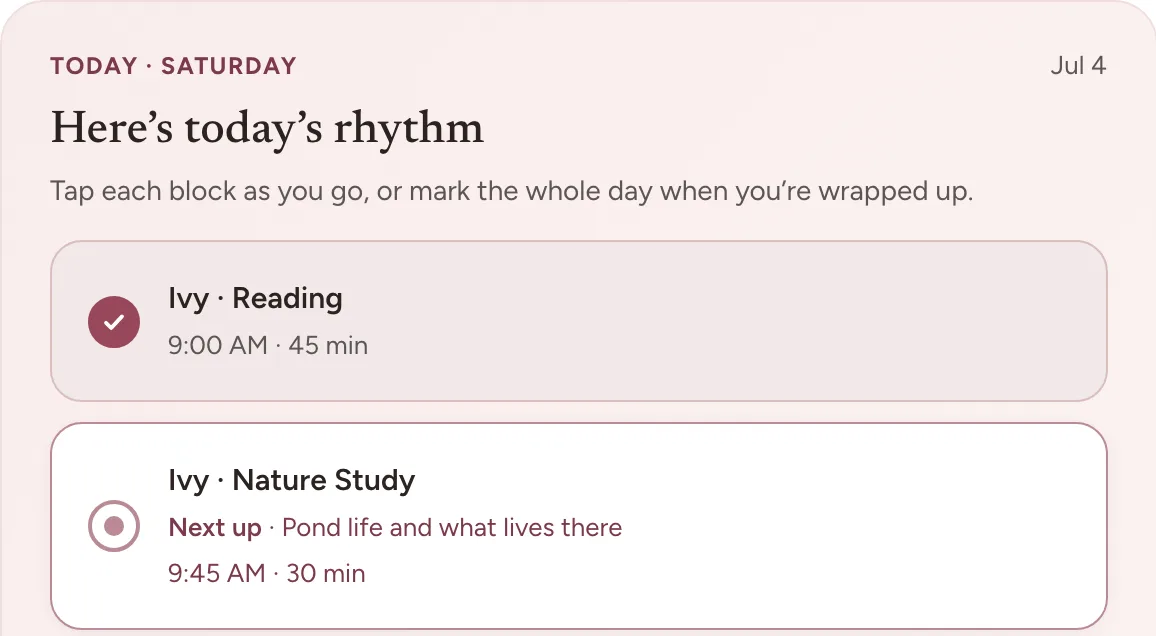
Ticks. Each subject planned for the day is a block, on Home and in the planner, and you tap it as you finish it. This is the part you will use most, and it takes one tap. A tick counts the day as a school day and brings that subject’s next lesson up. If you keep hours, it adds the subject’s usual length too. On a day that went as planned, one button on Home, We did school today, ticks every block at once.
Captures. For anything a tick does not cover. Capture offers a note, a photo, a grade, or a plan for a lesson or an exam, and each lands in its own place: a note in Notes, a photo in Moments, a grade in Records, a planned lesson on the planner, and an exam on Home as its day gets close. It is built to take a few seconds.
Records. One page for each child, with their school days, hours if you keep them, and grades. It fills itself from your ticks, photos, and grades, and a day you did school without ticking anything can be counted by hand. Its Documents card makes the PDFs you can hand to someone: a grade report, or a parent-issued transcript for a high schooler, an attendance log, a portfolio of notes and photos, and a records bundle.
What it deliberately does not do
It does not supply lessons or curriculum. There is no library of content to work through, and we do not write or host any. If you add a lesson outline, it is yours: you type it, or scan the contents page of a book you already use and check what it found. Either way, the app treats it as a list to tick rather than a syllabus to enforce.
It does not grade your year. There are no completion percentages, no overdue markers, and nothing that turns a quiet week into a warning. If you set an instruction-day goal of your own in Settings, under School year, Records shows On track while your count keeps pace with it. Counts grow as you record things, and they only go down when you change something yourself, such as taking back a tick.
It does not tell you what your state requires. It helps you keep the records your state asks for, and it counts your school days accurately, but the requirements themselves are your state’s to state and yours to verify. Check your current rules with your own state rather than with us.
Whose account this is
Yours, as the parent. There is one login, and it is the adult’s. Children do not have accounts, do not sign in, and have no screen of their own. That is a deliberate privacy decision rather than a feature we have not gotten to yet, and it is why we ask for so little about them: a first name and a grade level are enough to run everything above. For a high schooler there is one more box, Name on transcripts, which is optional and holds only the legal name a transcript prints.
You can add as many children as you like on one account, in Settings under Children. Each child has their own record, and what it holds changes with their grade: a seven-year-old’s record has no credits or GPA in it, and a high schooler’s has all of it.
Frequently asked questions
Do my children need their own logins? No, and they cannot have one. You are the only account holder, children never sign in, and there is no child-facing screen anywhere in the app. That is a deliberate privacy decision rather than a feature we have not built yet.
Does Bowerstead come with lessons or curriculum? No. We author no lesson content and host none. If you keep a lesson outline it is one you typed or scanned from your own book, and the app treats it as a list to tick rather than a syllabus to enforce.
Will a young child’s record show credits and a GPA? No. Grade level decides what exists for a child, so a seven-year-old’s record carries none of the high-school machinery. It appears when a child reaches high school and not before.
Where to go next
If you have just signed up, your first ten minutes walks through setup in order. If you are already set up and want the part that matters daily, read capturing work, which starts with ticking off the day.