Your first ten minutes
Setup takes a few minutes, one screen at a time. It asks every question before it shows a price, and choosing your plan comes last. None of it is permanent, and you can change every answer later. You do not need your whole year planned to start.
The setup steps
First, a password. After the code we email you, you choose a password. From then on you sign in with your email and that password. If you ever forget it, “Forgot your password?” emails you a code to choose a new one.
Joined with Google or Apple? Then there is no code and no password to choose: that button is how you sign in. You can still set a password in Settings, under Password.
1. How you homeschool. Traditional, Classical, Charlotte Mason, Montessori, Unschooling, Unit studies, a mix of approaches, or still figuring it out, with Prefer not to say beneath them. Choose one, then Continue. It shapes suggestions, such as which subjects are offered later and which tour Home starts with, and Charlotte Mason, Montessori and Unschooling skip the weekly timetable. Prefer not to say is a full answer, and it changes nothing.
2. Your homeschool’s name, and where you are. The name appears on your records and transcripts, so choose one you would be glad to see at the top of a transcript. Then your country, which tells setup which dates to suggest for your school year, and your state, in the United States only. We ask for the state because record-keeping expectations differ from one state to the next, and Bowerstead helps you keep the records your state asks for. Homeschooling rules are set where you live, and Bowerstead never decides them for you: verify your current requirements with your own state.
These first two answers are saved to your account as you give them, so they need a connection. From the next step on, setup carries on even if the connection drops.
3. When you teach. Tick your usual school days, Monday to Friday to begin with. Each subject repeats on them until you change it. Below them is your school year: August 1 to June 30, or January to December in Australia and New Zealand, and you can change either date. Starting partway through the year is normal. If you chose Charlotte Mason, Montessori, or Unschooling, this step asks only for the school year.
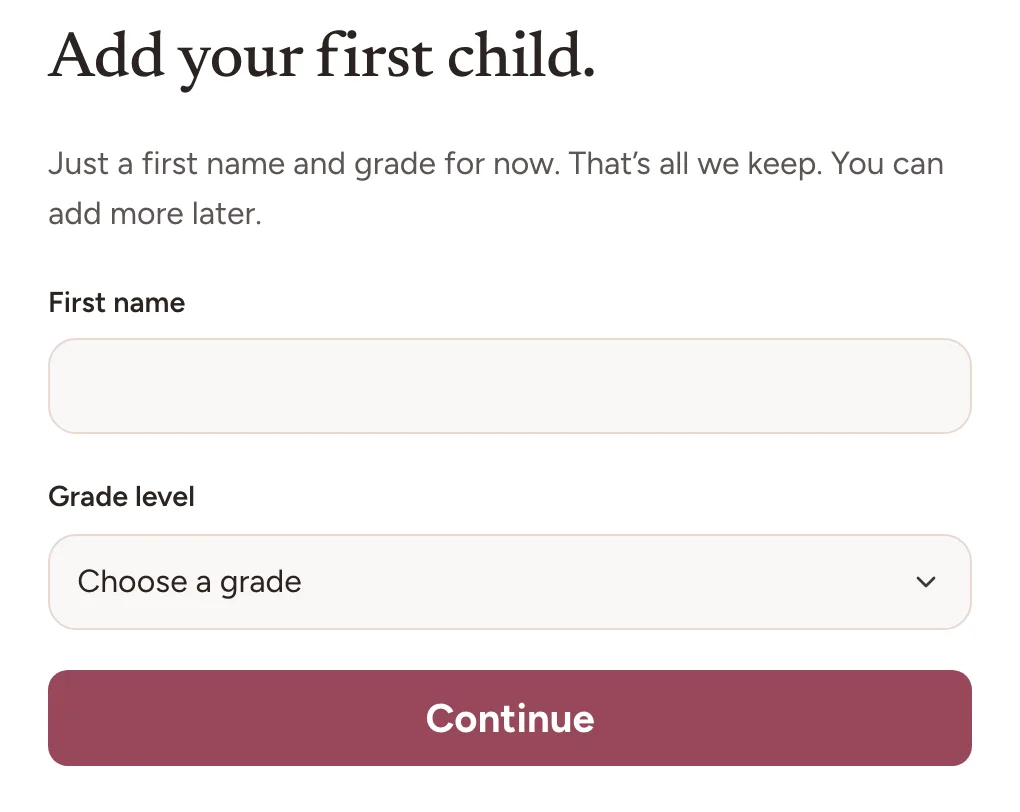
4. Your children. Add a child asks for a first name and a grade level, then Add child puts them on the list. That is all it asks, and the grade level is what decides which parts of the app appear for them. Add each child the same way; there is no limit. A child you leave out can be added later in Settings, under Children.
5. Subjects. One group at a time. With two or more children, Together comes first, for what you teach everyone at once, like History or a morning basket, then each child. Tick the subjects suggested, or type your own and add it. From the second child on, Same as copies the first child’s picks. Curriculum and lessons are not asked for here. Each subject gets those later in Curriculum, whenever you want them.
6. Your usual week. Each subject gets a color and the days it repeats on, starting from your school days. Tap a day to change it. If you chose Charlotte Mason, Montessori, or Unschooling, there is no usual week to set, and setup goes straight on.
On the subjects and the usual week, Skip for now keeps everything you have already picked, the group on screen included, and skips only the rest. Skipping the subjects skips the usual week too, and the subjects you kept go on your school days.
Then your week. Setup shows your usual week as the planner will draw it, from the coming Monday: the whole week on a laptop, one day at a time on a phone. If you chose Charlotte Mason, Montessori, or Unschooling, you see Capture instead, to try. Nothing you write there is saved. With no subjects, setup shows your children.
Then your plan. On the website, choose annual or monthly, through Stripe. The line below the plans gives the last day of your 30-day money-back guarantee. In the iPhone app or the Android app, the plans are the App Store’s or Google Play’s, with Restore purchases. One plan covers every child.
Decide later, beside the plans, keeps your answers on this device until you sign out, and nothing is charged. Come back to setup on the same device and it picks up where you left it. If you plan your weeks, it opens on your week again, with a welcome back.
Then “Saving your setup.” Once you have paid, everything you entered moves from this device into your account. It takes a moment, and then Home opens. If your payment is still being confirmed, the screen says so and waits, and your answers stay on this device in the meantime.
Where your answers wait
Your homeschool’s name, where you are and how you homeschool are saved to your account as you go. Your school days, children, subjects and week stay on this device until your plan starts, so nothing about your children reaches our servers before then. We have no reason to hold a child’s name for a family that has not chosen a plan.
So they wait on the device where you typed them, and a phone’s browser and the phone app count as two devices. Signing out clears them, unless a payment you started there in the last day may still be confirming. A private window keeps nothing once it closes, and setup says so when a browser is not keeping your answers.
After setup
Home. Your subjects line up in Today on your school days. Bower, the app’s AI helper, who answers questions about how Bowerstead works, starts a short tour there: where your usual week is kept, where each school day starts, and where your lessons go. Skip tour ends it on any step. The first time you ask Bower something, a card says what is sent and asks first: nothing goes until you choose Ask Bower.
If setup added no subjects, Home starts with Set up your week instead, in three steps: Add your children, already ticked, Add a subject, and Set the rhythm. An open step takes you to its part of Settings. Set up your week goes away once one of your subjects repeats on a day of the week, or once you tick or save your first thing.
If you chose Charlotte Mason, Montessori, or Unschooling in step 1, Home starts more simply, without the weekly steps, and Bower’s shorter tour shows where to capture a first learning moment.
The one thing worth doing on the first day
Tick a block. On a school day, your subjects line up in Today on Home. Tap one as you finish it, and it is ticked. That tap is the moment the rest of the app starts working, because school days, each subject’s next lesson, and hours, if you keep them, all build themselves out of ticks.
If Today says nothing is planned yet, no subject repeats on today’s day of the week. Weekly rhythm in Settings is where a tap on a subject lets you pick the days it repeats on, and on your first day, Set the rhythm on Home opens it. On a day with nothing planned, a photo or a grade saved in Capture still counts the day. If your school year has not started yet, Home says so in one line, and your first tick waits for the year’s first day.
A single tick also settles the question most new users have, which is what the app actually does with what you give it. Tick one block, then look at Records. The School days count will have moved on its own.
What you can safely skip
Full-year planning. Setup has already made your school year and your usual week, with whatever subjects you picked. Breaks and each subject’s list of lessons are both useful, and neither is needed before your first tick. Setting up the rest of the year in September and setting it up in pieces through October are both normal ways to use this, and neither is treated as the incomplete one.
Grading scales, too. The default is letter grades, and you can switch to percentages or a mastery note in Settings, under Your homeschool, until the first grade of the year is saved.
Frequently asked questions
Do I have to plan the whole year before I can use it? No. Setup makes the school year for you, and your usual week from the days you pick. Everything else is optional. Lessons, breaks and more subjects can all wait, and none of them are needed before you can record anything. Setting up the rest in September and setting it up in pieces through October are both ordinary.
Can I change my answers after setup? Yes, all of them. How you homeschool, your homeschool name, and your country and state are in Settings, under Your homeschool. Your children and their grade levels are under Children, your school year’s dates under School year, your subjects under Subjects or in Curriculum, and the days each one repeats on under Weekly rhythm. None of the answers are permanent.
What happens if I skip the subjects step? Skip for now keeps every subject you have already ticked, the group on screen included, and skips the rest, along with your usual week. The subjects you kept go on your school days, your school year is still made, and setup goes on to show your week and your plan. Add subjects whenever you are ready, in Settings, under Subjects, or with Add subject in Curriculum. A subject you teach together can go in for all your children in one save.
What happens if I choose Decide later? Nothing is charged, and your answers stay on this device until you sign out. Come back to setup on the same device and it picks up where you left it, with your plan still to choose. On another device, or after signing out, setup asks its questions again from the school days on. How you homeschool, and your homeschool’s name and place, are already saved.
I paid on another device. Do I have to start again? Not if you go back to the device where you answered setup. Open setup there, and once your answers are in, it says Your plan is active, and Continue saves them. Setup on a device that holds no answers, the phone app after a phone’s browser included, asks its questions again from the school days on.
Can I delete my account before choosing a plan? Yes. Delete your account is below the questions on every setup screen, and below the plans, until a plan starts. We email you a code to confirm it, and it also clears the answers waiting on this device.
Can I skip the welcome tour? Yes. Skip tour, the close button or the Escape key ends it on any step, and nothing depends on finishing it. If you simply leave partway, it picks up at the same step on your next visit, once, on the same device. Take the quick tour, in Settings under Help and contact, starts it again whenever you like.
Where to go next
Capturing work covers the daily habit. Subjects and your week covers the rest of the planning, whenever you want it.