The online homeschool planner that keeps your records too
Bowerstead is a digital homeschool planner where the week and the curriculum are linked. Plan a normal week once, tap each lesson as you finish it, and the record builds itself as the year goes.
What most homeschool planning apps get wrong
Most apps for homeschool planning are built as though the problem were organization: a tidier grid, more boxes, a longer checklist. The plan ends up in one place, the curriculum in another, and what you actually did in a third, so every finished lesson gets written down twice.
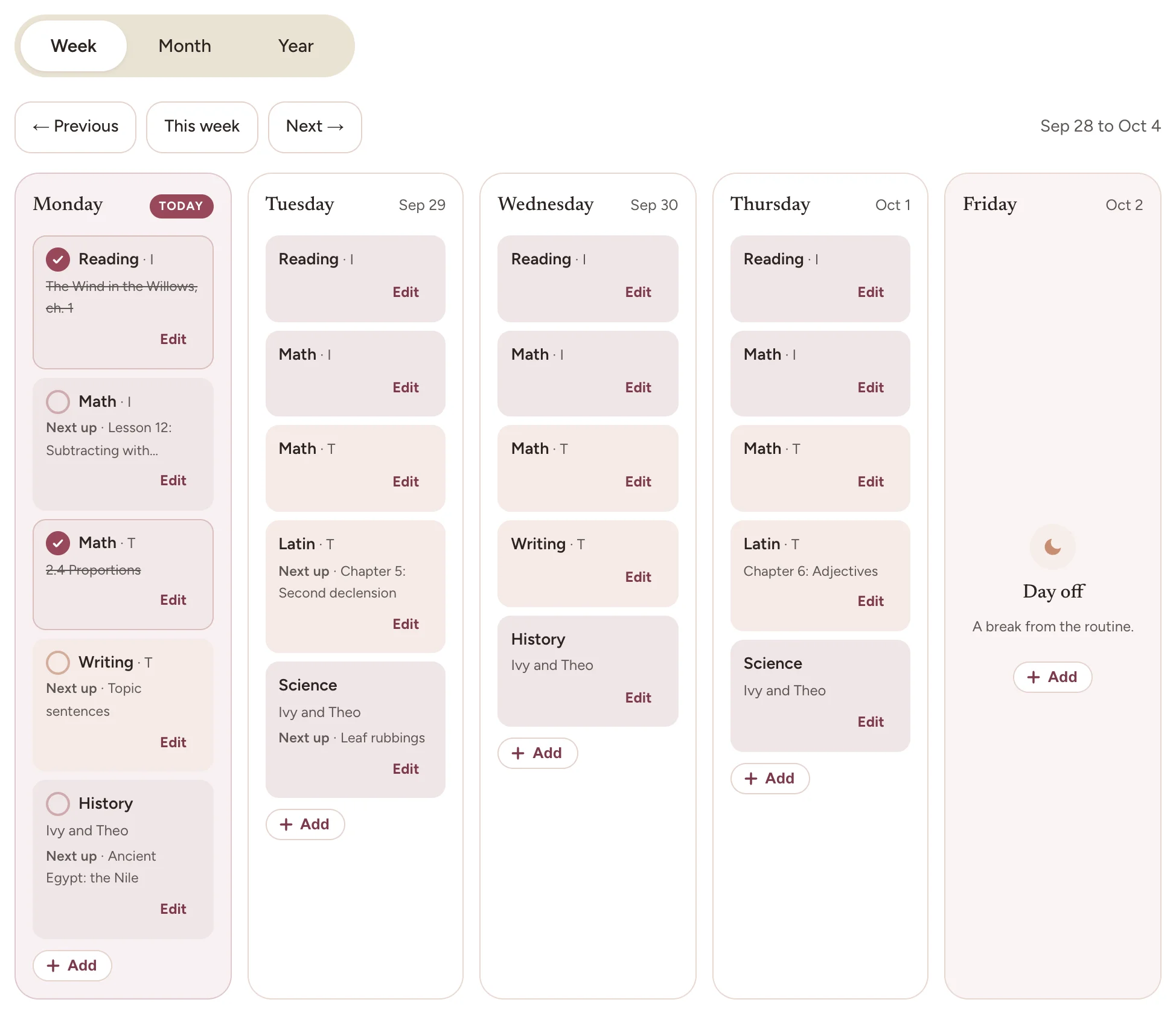
Bowerstead keeps all three together. Your curriculum sits behind the week, so each planned block already knows which lesson comes next. The week you planned and the week you had are the same screen, and neither one is scored against the other.
One tap, and the day is written down
Open Today and tap each block as you finish it.
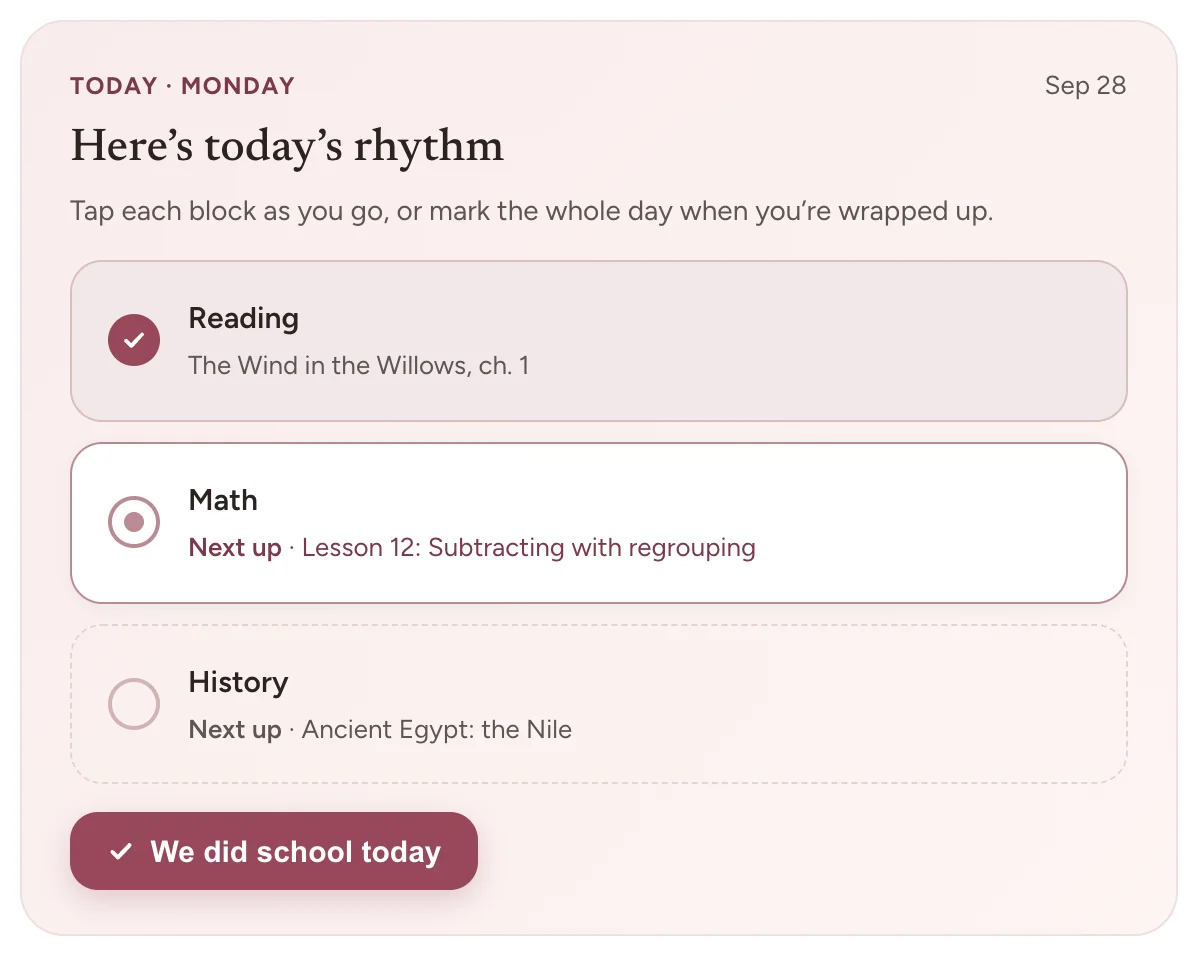
That one tap does the paperwork a paper planner leaves for later:
- The lesson is checked off your curriculum, with the date.
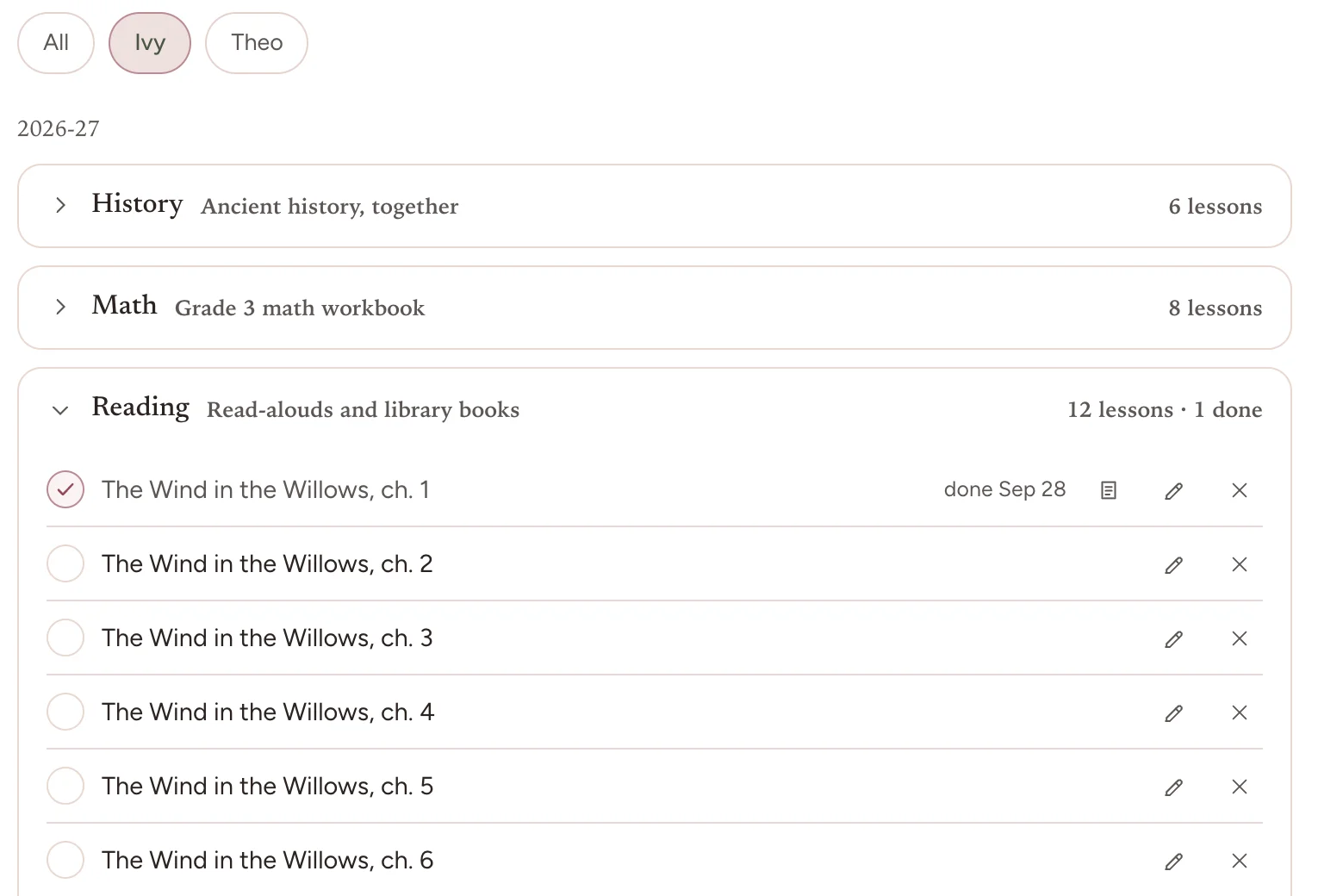
- The next lesson in that subject moves up, ready for the next time it is on the week.
- The day counts as a school day in your attendance.
A day that goes differently needs nothing from you. A lesson you did not get to goes back to the top of its list and waits, with nothing to reschedule and nothing marked late. When the whole plan happened, the “We did school today” button marks the day in a single tap.
Planning and records in one place
The planner and the paperwork are usually two different products, or one product and a shoebox. Keeping them together is the whole idea here, because the record is a byproduct of the week rather than a second job you do in June.
- Plan the week. Set a weekly rhythm of subjects and activities once, for one child or several, and it repeats. Add a time when a class starts at one, and leave it off when the day runs to its own pace.
- Set out the curriculum. It doubles as your lesson planner: add each subject’s lessons, one per line, and give any lesson notes such as pages or materials. Children who share a class can share one lesson list.
- Capture the rest. A note, a photo, or a grade, for what happened outside the plan. Evidence counts in any form, and a worksheet is not the only real kind.
- Keep the roster. Children, and notes for the family or for one child, pinned to Home when they matter. You can add as many children as you have; there is no per-child charge and no cap.
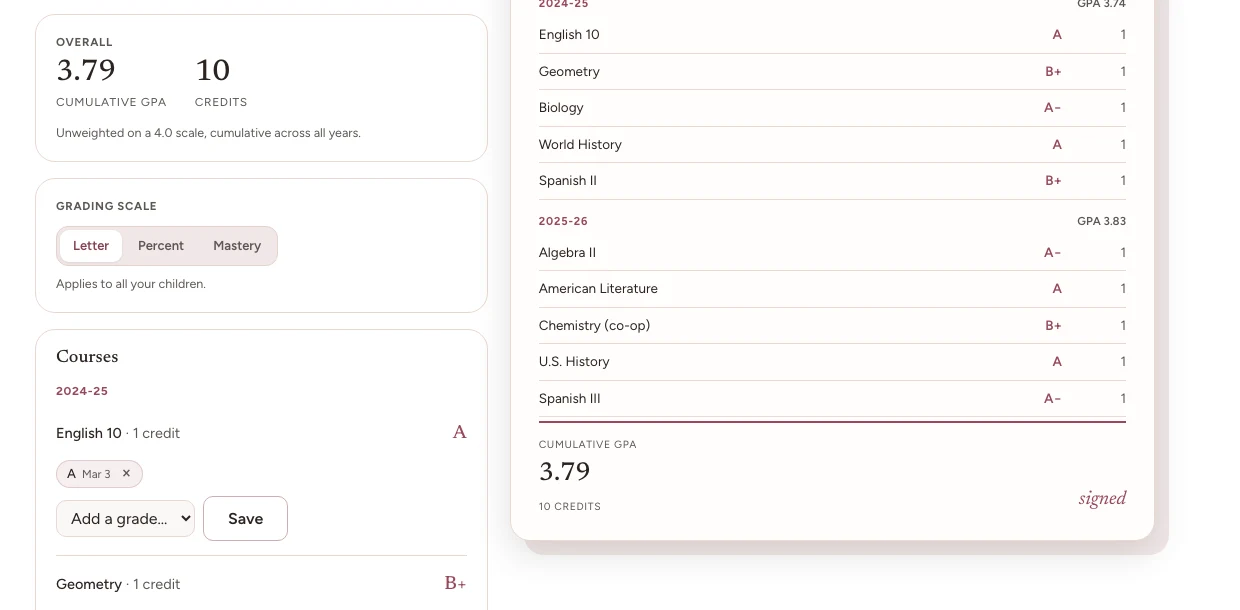
- Hold the records. Instruction days, a gradebook by subject on a letter, percentage or mastery scale, credits, a cumulative GPA, and a transcript you can print.
- Keep every year. Each school year is saved on its own, grades and transcript included, so last year is there to look back on. Moments hold the things that were the point but never fit in a gradebook.
Record keeping software that says what it does not do
Homeschool record keeping software tends to promise compliance, which is a promise no software can honestly make, because the requirement is set by your state and changes without telling anyone. Bowerstead is deliberately narrower, and it is worth knowing where the edges are before you pay for it.
- It does not supply a curriculum. You bring the one you already use and add its lessons. It does not spread them across the year either: you plan the week, and the next lesson follows.
- It does not track spending. There is no expense log and no receipt capture. If you are documenting an education savings account, this is not the tool that does that part.
- It does not check your hours against your state. It totals the instruction time you log, on the child’s record and on the transcript, but a capture with no time entered counts as thirty minutes, so the figure is an estimate. A handful of states set an hours requirement, and if yours is one of them, comparing the two is still yours to do.
- It does not tell you what your state requires. It holds your records in a general format. Confirming what your state asks for is still yours to do, and our state guides are the honest version of that answer.
- It has no guilt mechanics. No overdue flags, no streaks to break, no red badge counting what you missed. A plan you did not follow is not a failure and we will not render it as one.
What is free here, and what is not
Plenty of people searching for a free online homeschool planner are after one document, not a subscription, and that is a reasonable thing to want. We build those separately and give them away, with no account and no signup.
Eight tools are genuinely free: a transcript generator, a schedule builder, a report card maker, a GPA calculator, an attendance tracker, a portfolio cover, a diploma maker and a student ID card. Each one renders on screen and gives you a PDF built to print properly. If a free online gradebook is what you came for, the report card maker and the GPA calculator are the two to start with.
The tools are free and stay free. The planner is the paid part, and the difference is continuity: a tool makes one document from what you type in, and the planner is where a year accumulates so the document is already true when you need it. Browse all eight free tools.
On the web, and on your phone
Bowerstead runs in a browser and as a real app on iPhone and Android. It is one account either way, and one set of records: plan the week on a laptop at the kitchen table, tap through the day on your phone, and both are the same week by the time you sit back down.
The phone is where the day happens, so that is where the tapping belongs. It keeps working without a signal and catches up when you reconnect. It is also where the photographs are: the experiment that finally worked, the model built on the floor. They land in the same record your transcript is built from.

What it costs
Bowerstead is $9 a month, $79 a year, or $249 once for lifetime access, for your whole family rather than per child. There is no free trial. Every plan carries a 30-day money-back guarantee instead, which we think is the better deal in both directions: you get to use the real thing rather than a limited version of it, and nobody has to remember to cancel something before a clock runs out.
If you stop paying, your account does not close and your records do not disappear: it drops to read-only, and reading and exporting stay open. Your transcript is still yours to print.
Frequently asked questions
Is there a free homeschool planner app?
Not this one, and we would rather say so on the way in than after you have made an account. Our eight document tools are free with no signup. The planner itself is paid, because it stores your family’s records year after year and that is a commitment we would rather fund honestly than with ads or by selling anything about your children.
Does it work on a phone?
Yes, two ways. There is a Bowerstead app on the App Store and on Google Play, and the site itself runs in the browser on a phone, a tablet or a laptop. The same account carries across all of them, so nothing has to be moved or re-entered. Planning the week on a laptop and tapping through the day on a phone is how the two fit together.
Can I use it for more than one child?
Yes, and there is no extra charge for it. Add as many children as you have. Each one keeps their own subjects, records and transcript, and the planner shows the household week rather than making you switch between them.
What is the difference between this and a printable planner?
A printable is finished the moment you print it, which is exactly right for a wall and exactly wrong for a record. A sheet of paper cannot cross a lesson off your curriculum, move the next one up, or count the day, and in Bowerstead one tap does all three. Keeping the homeschool planner online is what earns its place when the year has to add up to something at the end: attendance that was ticked as it happened, grades that were entered as work was marked, and a transcript that assembles itself from both. If you want the printable version first, the free schedule builder makes one.
Is an electronic homeschool planner the same as a digital one?
Yes. An electronic homeschool planner, a digital homeschool planner and an online homeschool planner are three names for the same thing, and which one you say tends to depend on when you first met the idea rather than on any difference in the software. All three mean a planner that keeps the year rather than printing it, so if you have been searching one of those phrases and finding results that look unrelated, that is why. Bowerstead is all three.
Start where it is quietest. Set up one child and one week. If it has not made the year feel more manageable within 30 days, write to us and we will refund it.